
Describe the Move, Get the 3D Animation
Avatar SDK Move is an AI text-to-animation engine for human characters: you type what the character should do, and Move generates a ready-to-play 3D animation — no motion capture, no keyframing, no digging through a clip library for something close enough.
Move is a text-to-motion generator: the result is an animation file for a 3D character — not a video — so it drops into your game, app or scene.
- Input
- A plain-language prompt, e.g. "a woman performs a martial arts combo"
- Output
- A rigged Humanoid animation clip, 5–10 seconds, FBX or GLB
- Where
- MetaPerson Creator in your browser, and the Move Unity plugin
- Price
- About a dollar per generated animation — in your browser or in Unity
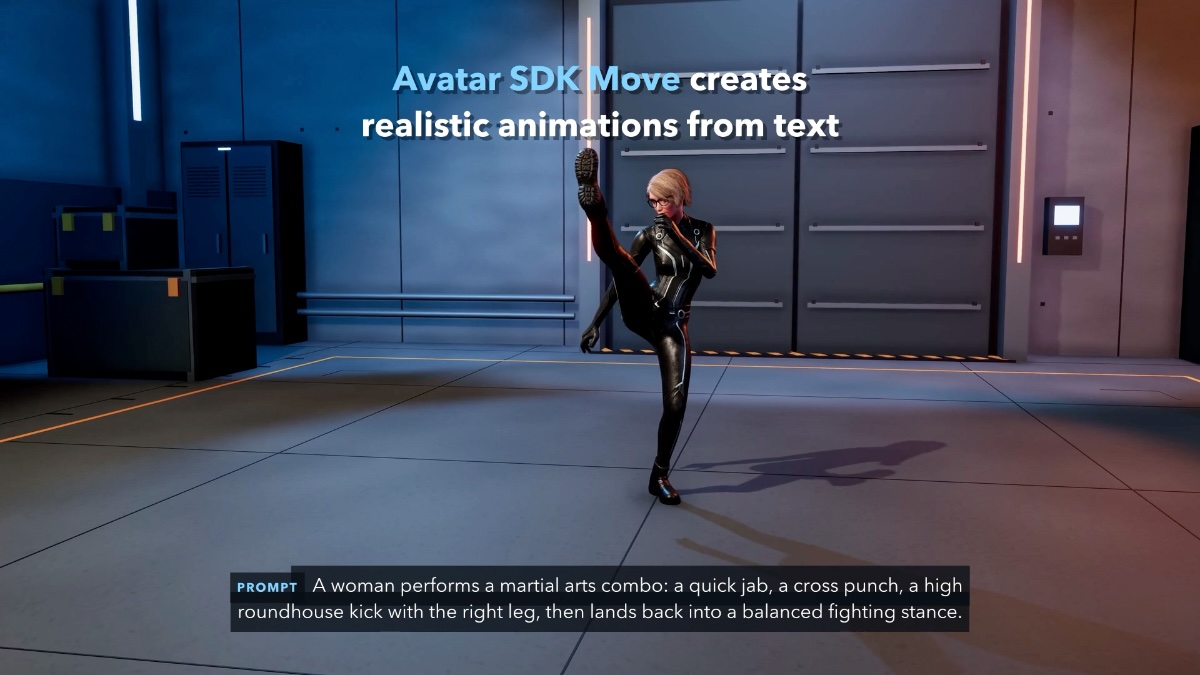
Generated from the prompt: "A woman performs a martial arts combo: a quick jab, a cross punch, a high roundhouse kick with the right leg, then lands back into a balanced fighting stance."
See it move
Realistic animations from text
What kind of tool this is
Text to 3D animation, not text to video
Most "text to animation" tools generate a flat video clip. Avatar SDK Move is an AI motion generator for 3D characters: you generate an animation from a text prompt and get a rigged clip — FBX or GLB, with root motion — that plays on your own avatar in the browser or on any Humanoid model in Unity, and can be retargeted, blended and edited like any other animation. If you need a 3D character to perform an action you can describe, this is the right tool; if you need a finished video, it is not.
What you get
From an idea to a character animation in minutes
Prompt in, animation out
"Walk confidently", "wave to the crowd", "a hip-hop dance" — describe the action and Move generates the motion. No mocap suit, no animator hours.
Natural, lifelike motion
The upgraded engine handles everyday locomotion and expressive, performance-style movement — gestures, dance, combat — with weight and timing that read as human.
Your character, not a mannequin
Preview on your own MetaPerson avatar in the browser, or on any Humanoid model in Unity. Retargeting is handled for you.
Standard formats
Export FBX or GLB that drops into Unity, Unreal Engine, Blender, three.js and Babylon.js. Clips arrive as standard Unity Humanoid animations.
Editor and runtime
Build a clip library in the Unity Editor, or let players describe a move inside your shipped game — WebGL included.
Iterate, don't commission
Block out a scene, explore ten variations of a gesture, or react to a script change the same afternoon — each try is a sentence, not a shoot.
Two ways to use it
In the browser or in Unity
MetaPerson Creator
Open the web editor, pick your avatar, describe the movement. The animation is generated and previewed on your own avatar, then exported together with the model. About a dollar per animation — the fastest way to see what Move can do.
Try it in your browser →Move Unity plugin
The same pipeline inside the Unity Editor and your running application: type a prompt, get a Humanoid FBX clip on any humanoid model, or generate animations at runtime from one method call. About a dollar per animation.
Plugin page and download →In MetaPerson Creator
Type, generate, export — on your own avatar
A prompt, a duration, one button
Describe the animation, set the duration, press Generate. The result plays on the avatar you built from your selfie, and every clip stays in "My Animations" so you can come back and export it later.
Exports go out as FBX or GLB with the avatar's rig, Mixamo-compatible, so existing animation libraries keep working alongside the clips Move generates.
Open MetaPerson Creator →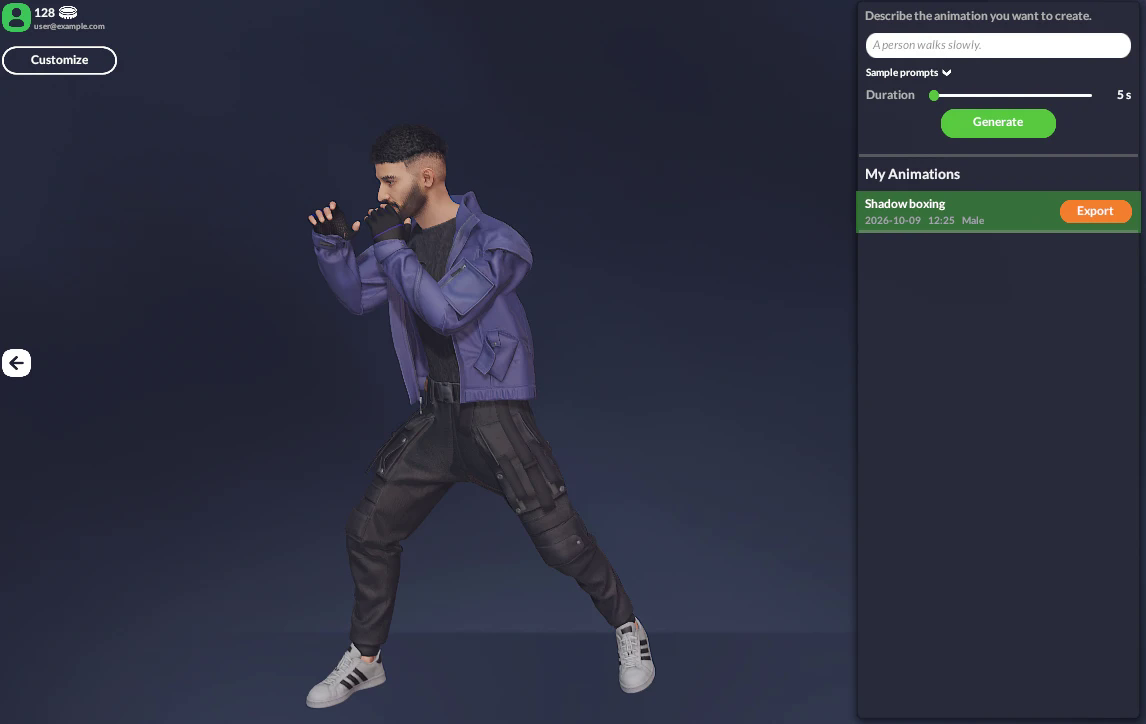
A prompt, a duration and the generated animation playing on the user's MetaPerson avatar.
Use it to power
Wherever characters need to move
Games and NPCs
Idle variations, emotes, reactions and story beats for characters that would otherwise share the same three clips.
Virtual worlds and social apps
Let users express themselves with movements they describe, generated on their own avatars.
Training and onboarding
Demonstrate procedures and gestures with animated instructors instead of filming every variation.
Marketing and virtual production
Block out scenes and try new character movements before committing to mocap or a studio session.
Prototyping
Test an animation idea in minutes, keep the ones that work, regenerate the rest.
Characters driven by text
Pair Move with LLM-driven characters: the dialogue decides the action, Move produces the motion.
FAQ
Avatar SDK Move — common questions
What is Avatar SDK Move?
Avatar SDK Move is an AI text-to-animation tool that generates 3D character animations from a natural-language prompt. You describe a motion in plain words and Move produces a ready-to-use, rigged animation for your avatar or any humanoid character.
How does text-to-animation work?
Type a prompt describing the motion — for example, "walk confidently" or "wave to the audience" — choose the duration, and Move generates the corresponding 3D animation in the cloud. No motion capture, rigging or manual keyframing is required.
What formats can I export animations to?
FBX and GLB, so the clips work with all major 3D engines and content-creation tools. In Unity, animations arrive as standard Humanoid clips usable in Animator Controllers, Timeline and blend trees.
Where is Avatar SDK Move available?
In MetaPerson Creator in your browser, and in Unity through the Move Unity plugin (Editor and runtime, Unity 6000.0+). Need Move in your own pipeline? Talk to us.
What does it cost?
About a dollar per generated animation, in MetaPerson Creator and in the Unity plugin alike — both use the same account and balance. Free animations on your account are used first, and generation is not charged with an active Avatar SDK subscription.
Does it work with my own characters?
Yes. In Unity, Move animates any model Unity maps as Humanoid, with automatic retargeting. In MetaPerson Creator it animates the avatar you create from a selfie.
How long does it take to generate an animation?
A few minutes per clip; the interface shows the time left, and you can queue several animations and keep working meanwhile.
Is Avatar SDK Move a text-to-motion tool?
Yes. Text-to-motion and text-to-animation mean the same thing here: a text prompt goes in, a 3D character animation comes out. The output is a Humanoid animation clip, not a rendered video, so you can retarget it, blend it with other clips and edit it in your engine.
Can I generate a 3D animation from a text prompt for free?
Generation itself is paid — about a dollar per 5-second clip, billed from the same account balance in MetaPerson Creator and in the Unity plugin. Creating the avatar you animate is free: your first MetaPerson avatar in the browser costs nothing.
Can I use the generated animations in Unreal Engine, Blender or on the web?
Yes. Export FBX or GLB and import the clip wherever a rigged 3D animation is accepted: Unreal Engine (with retargeting), Blender, three.js and Babylon.js. In Unity the Move plugin delivers clips directly as Humanoid animations.
What changed in the October 2026 update?
The animation engine was upgraded: movements look much more natural and lifelike, and the Unity plugin reached version 1.0. Details in the announcement.
Technical details, integration notes and requirements: Avatar SDK Move documentation.
Your next animation is a sentence away
Open MetaPerson Creator, describe the movement, and watch your avatar perform it. Bring it into Unity with the plugin.
Coming from Mixamo? See the Mixamo alternative comparison.