
Text-to-Animation in Unity — Type a Prompt, Get a Rigged Clip
Avatar SDK Move Unity plugin is a text-to-animation tool for Unity: describe a movement in plain words, and a few minutes later a rigged Humanoid animation clip is in your project — imported, retargeted to your character and playing in the preview. Works in the Editor and inside your shipped game, including WebGL.
Version 1.0 · Unity 6000.0+ · Windows, macOS, Linux, WebGL, Android, iOS · about $1 per animation- What it does
- Generates a 3D character animation from a text prompt (AI text-to-motion), 5–10 seconds per clip
- Works with
- Any Unity Humanoid model — your characters, store assets, MetaPerson avatars
- Output
- Humanoid FBX clips in the Editor; GLB applied in memory at runtime
- Price
- Plugin free; about $1 per generated animation, paid with the same account as MetaPerson Creator
What you get
Animations on demand, without mocap or keyframing
Prompt in, clip out
"A person curtsies gracefully" becomes a 5–10 second Humanoid clip, generated in the cloud while you keep working.
Any humanoid character
Works with every model Unity maps as Humanoid — your own characters, store assets or the included MetaPerson samples. Bone names do not matter.
Retargeting that reads right
Bones are transferred as deltas from the rest pose and root motion is scaled to hip height, so a tall knight and a short cartoon fox both move believably.
Editor and runtime
Build a clip library as assets in the Editor, or let players describe a move and watch it play in the running game — WebGL included.
Standard Unity output
Clips arrive as Humanoid FBX and work anywhere: Animator Controllers, Timeline, blend trees. One button builds an Animator Controller for you.
One account, shared balance
Sign in with your email; the balance is shared with MetaPerson Creator, free animations are used first, and Avatar SDK subscribers are not charged.
How it works
Four steps to your first animation
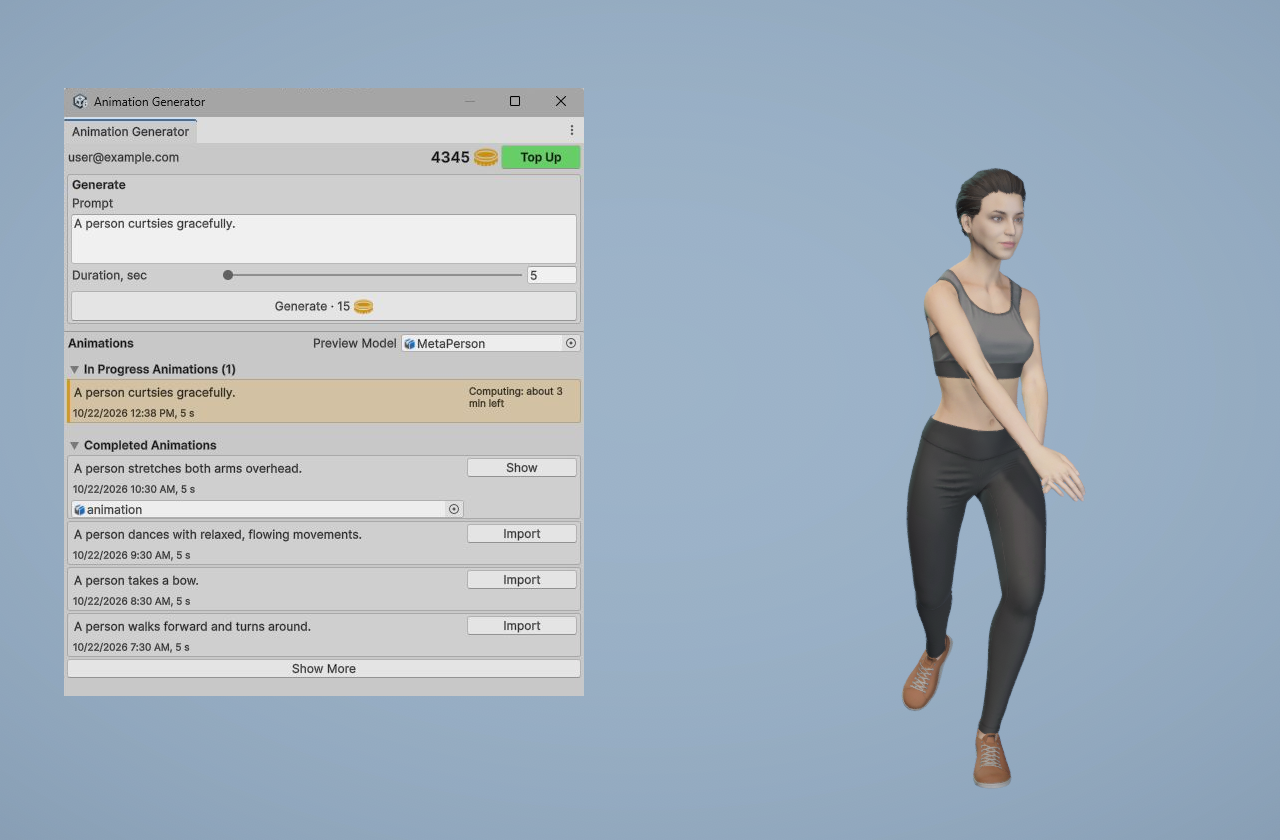
- Open Avatar SDK Move → Animation Generator. The window docks next to your Scene view.
- Type what your character should do and choose the duration. The price is shown right on the Generate button — about a dollar per clip.
- Press Generate. Generation runs in the cloud and takes a few minutes; the window shows the time left, and you can queue the next animation meanwhile.
- Press Show. The clip is imported as a Humanoid FBX and plays on your own model, not a mannequin. Every animation stays in your account history for other projects.
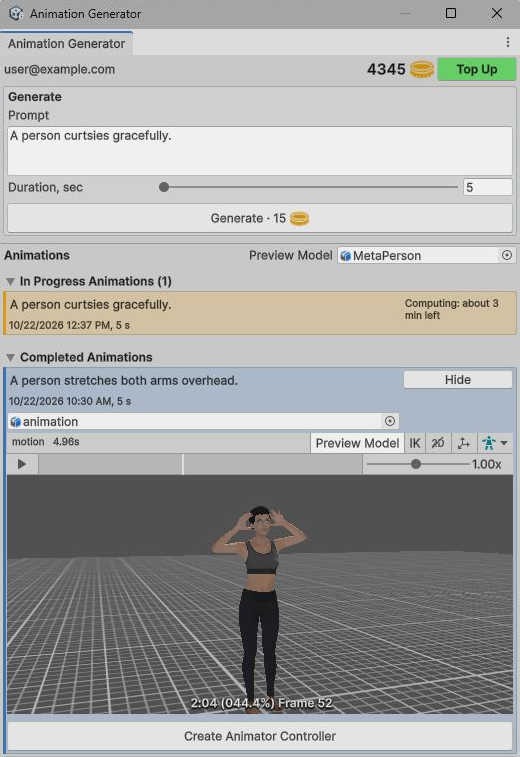
The generated clip previewed on your character, one click from an Animator Controller.
Any character
The same animation, on very different bodies
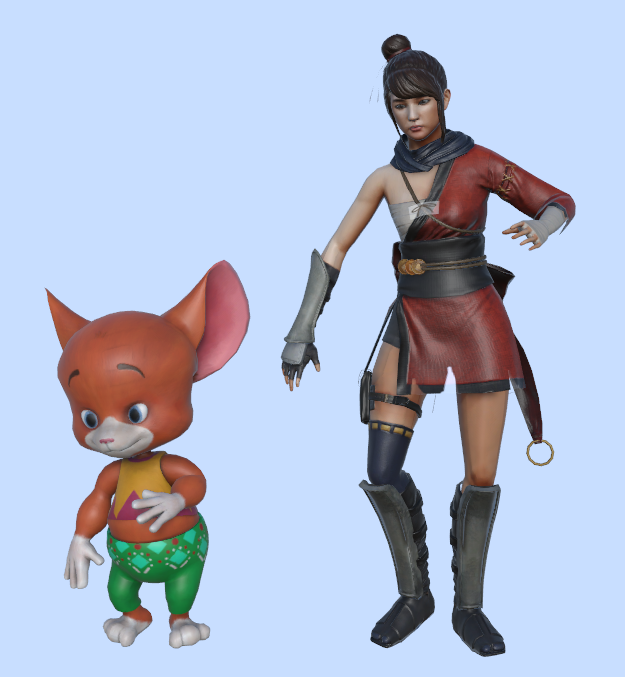
One prompt, one clip — a cartoon fox and a realistic MetaPerson character.
Retargeting is not a naive rotation copy
Each bone is transferred as a delta from its rest pose, so proportions and skeleton orientations that differ from the source still read correctly. Root motion is scaled to your character's hip height: a tall character and a short one both travel a sensible distance.
You never touch the mapping yourself — Unity's Humanoid avatar is all the plugin needs.
Technical details in the documentation →Runtime
Let your players invent the moves
Ship an application where the animation does not exist until someone asks for it. Drop in the AnimationGenerator prefab and call one method — the result plays on your character, in a desktop build or in the browser.
// one call: generate from a prompt and play on the character
await animationGenerator.Generate(targetModel, prompt, duration);

// or split it: start now, play when ready
var job = animationGenerator.StartGeneration(prompt, duration);
// … later …
await animationGenerator.Play(targetModel, job);
The sample scene ships a ready-made AccountPanel prefab — email sign-in, balance and a Top Up button — plus the user's animation history. Runtime clips are parsed in memory as GLB, which is what makes the whole flow work in WebGL.
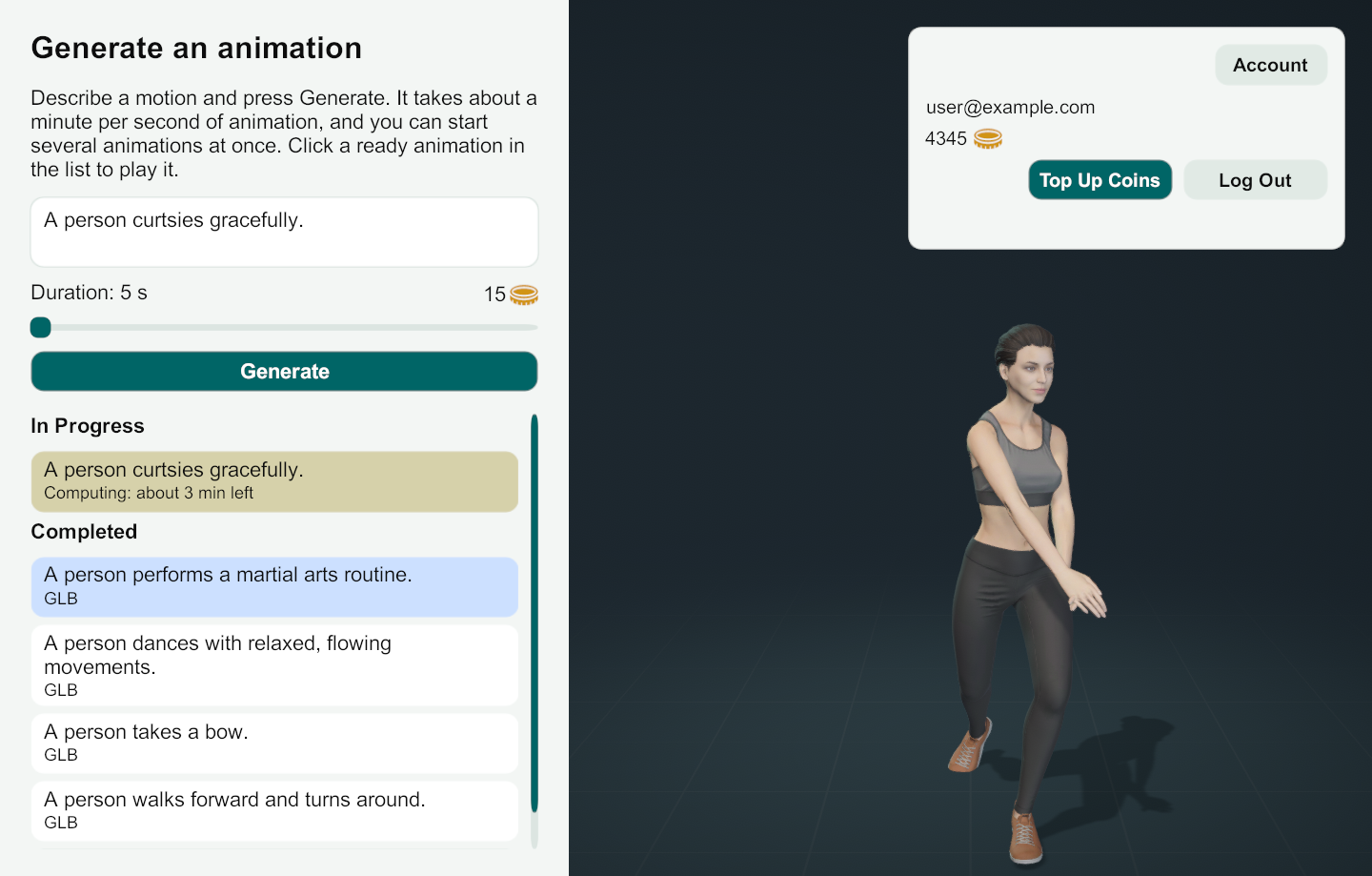
The runtime sample: the user types a prompt and the animation is generated in the running application.
Pricing
About a dollar per animation, nothing else
The plugin itself is free; you pay only for the animations you generate — about a dollar for a 5–10 second clip, from the same account you use in MetaPerson Creator. The Top Up button opens the shop already signed in. Free animations on your account are used first, and with an active Avatar SDK subscription generation is not charged.
FAQ
Avatar SDK Move Unity plugin — common questions
Which Unity versions does the Avatar SDK Move plugin support?
Unity 6000.0 and newer, on Windows, macOS, Linux, WebGL, Android and iOS.
Do I need to use Avatar SDK characters?
No. Any model with a Humanoid Avatar works. MetaPerson sample characters are included so you have something to test with immediately.
What format are the generated animations?
In the Editor, animations arrive as FBX and are imported as standard Unity Humanoid clips usable anywhere in your project — Animator Controllers, Timeline, blend trees. At runtime, they are delivered as GLB and applied directly to your character. Clips are standard Humanoid animations, so you can use Move alongside Mixamo on the same character in one Animator Controller.
Can players generate animations inside a shipped game?
Yes. The runtime API is designed for it: one method call generates an animation from a text prompt and plays it on your character. The included sample is a working example with sign-in, a prompt field, a Generate button with the price and the user's animation history.
Does text-to-animation work in WebGL?
Yes. Runtime generations are parsed in memory and applied directly to the character, so the whole flow runs in a WebGL build.
What does the Avatar SDK Move Unity plugin cost?
The plugin is free. A generated animation (5 to 10 seconds) costs about a dollar, paid from the same account as MetaPerson Creator. Free animations on the account are used first, and generation is not charged with an active Avatar SDK subscription.
How long does animation generation take?
A few minutes, longer for longer animations. The plugin shows an estimate of the time left, and you can keep working or start the next animation in the meantime.
What if a generation fails?
The plugin shows the animation code. Send it to support@avatarsdk.com.
Installation steps, API reference and sample scenes: Move Unity plugin documentation.
Your next animation is a sentence away
Import the package, sign in with your email, open Animation Generator and describe the first move. The clip plays on your character a few minutes later.