
Mixamo Alternative for the Animations Mixamo Doesn't Have
Mixamo is a free library of ready-made character animations. When the clip you need isn't in it, Avatar SDK Move generates it from a text prompt and gives you a Humanoid animation for the same rigs you already use with Mixamo.
- Input
- A plain-language prompt describing the motion
- Output
- A rigged Humanoid clip, 5–10 seconds, FBX or GLB, with root motion
- Rig
- Humanoid, so it sits next to your Mixamo clips
- Price
- About $1 per generated 5-second clip
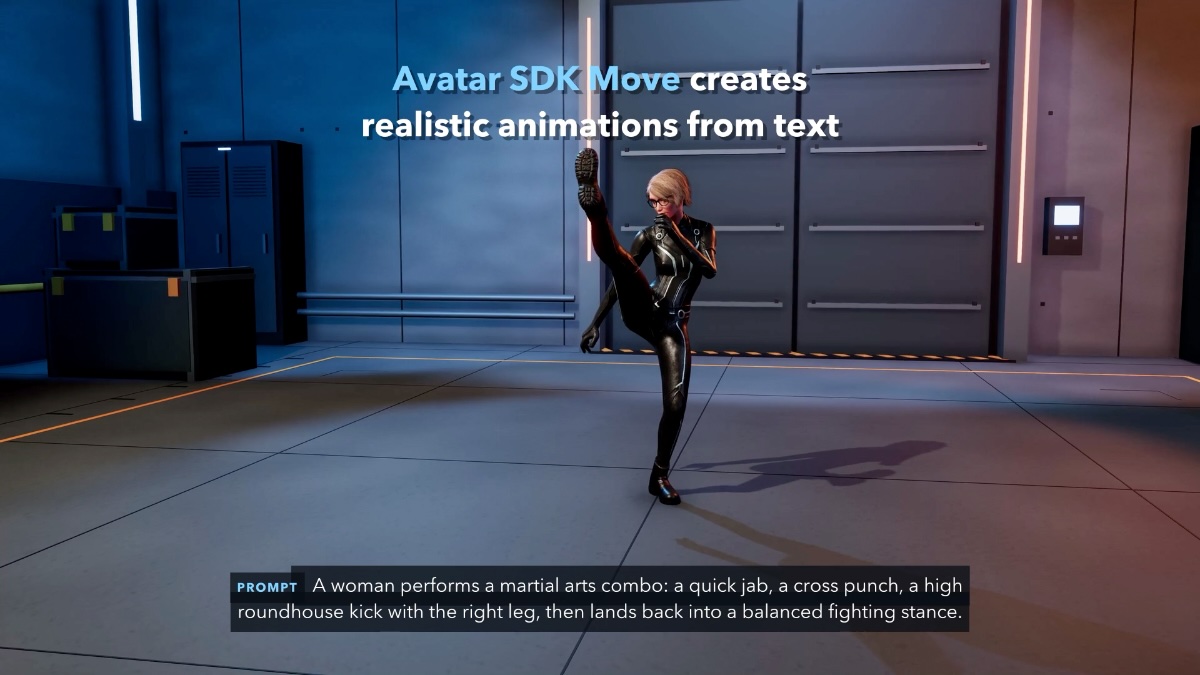
A martial arts combo generated by Move from a one-sentence prompt.
The honest starting point
What Mixamo gives you, and where it stops
Mixamo does two useful things for free: it auto-rigs a character and it gives you a library of pre-made animations to apply to it. For walks, runs, jumps, idles and common fights, that library is often all a project needs, and we suggest you keep using it.
The limit is the library itself. You pick from what is there; you cannot describe a new motion. If your scene needs a character to check a watch and then hurry off, or a referee to signal a foul, you end up taking the closest clip, editing keyframes by hand, booking a mocap session or dropping the idea. That gap is what people usually mean when they search for a Mixamo alternative.
Side by side
Mixamo vs Avatar SDK Move
They solve different problems. Mixamo is a library you choose from; Move is a generator you describe to.
| Mixamo | Avatar SDK Move | |
|---|---|---|
| How you get a clip | Pick from a library of pre-made animations | Describe the motion in a text prompt and generate it |
| Rig | Auto-rigging for your character | Humanoid clip; in Unity, plays on any model mapped as Humanoid with automatic retargeting |
| Formats | Downloadable animation files | FBX or GLB, 5–10 seconds, with root motion |
| Where it runs | Website | MetaPerson Creator in the browser, and the Move Unity plugin (Editor and runtime) |
| Price | Free library | About $1 per generated 5-second clip |
| Best for | Common motions that already exist in the library | Specific motions the library doesn't have |
Prompt examples
10 prompts you won't find in a library
Each of these fits a 5–10 second clip. Type them as written, or change the details to match your scene.
- EverydayA man glances at his wristwatch, sighs, and starts walking quickly to the left.
- EverydayA woman picks up a box from the floor, struggles with the weight, and puts it back down.
- GesturesA person waves both arms above the head to get the attention of someone far away.
- GesturesA referee blows a whistle and points firmly toward the penalty spot.
- PerformanceAn actor bows deeply to the audience, straightens up and blows a kiss.
- PerformanceA person does a short, clumsy victory dance, then looks around embarrassed.
- CombatA fighter dodges to the right, ducks under a punch and counters with an uppercut.
- CombatA soldier crouches behind cover, peeks out, and quickly pulls back.
- SportsA basketball player dribbles twice, jumps and takes a one-handed shot.
- SportsA goalkeeper dives to the left, lands on the side and gets back up.
Not either-or
Use both: Mixamo for the library, Move for the rest
Both produce Humanoid animations, so they live on the same rig. Keep your Mixamo walks and idles, and generate only the clips the library can't give you. Swapping tools is not required.
MetaPerson avatars take Mixamo clips
MetaPerson avatars use a Mixamo-compatible Humanoid rig. Our documentation shows how to apply Mixamo animations to a MetaPerson avatar, and Move clips play on the same avatar in MetaPerson Creator.
Mixamo animations on MetaPerson avatars →Any Humanoid model in Unity
The Move Unity plugin animates any model Unity maps as Humanoid, with automatic retargeting. In the Editor clips are saved as project assets; at runtime players can describe a move in your shipped game.
Move Unity plugin →FAQ
Mixamo alternative: common questions
What is a good Mixamo alternative?
It depends on what is missing. If you need a different library, look at other clip libraries. If you need a specific motion that no library has, a text-to-animation tool like Avatar SDK Move generates it from a prompt and outputs a Humanoid clip you can use next to your Mixamo animations.
Is Avatar SDK Move free like Mixamo?
No. Generation costs about $1 per 5-second clip, paid from coin packs (75 coins for $6, 300 for $21, 700 for $42). The same balance works in MetaPerson Creator and in the Unity plugin. Your first MetaPerson avatar in the browser is free.
Does Move replace Mixamo?
No, and it isn't meant to. Mixamo is a free library of common animations; Move generates the ones that aren't in it. Both are Humanoid, so you can use them on the same character.
What formats does Move export?
FBX or GLB. Each clip is a rigged Humanoid animation of 5–10 seconds with root motion.
Does it work in Unity, Unreal Engine and Blender?
Yes. The Move Unity plugin (Unity 6000.0+; Windows, macOS, Linux, WebGL, Android, iOS) delivers clips as Humanoid animations. Exported FBX or GLB files also work in Unreal Engine with retargeting, Blender, three.js and Babylon.js.
Can I use Move with my own characters?
Yes. In Unity, Move animates any model Unity maps as Humanoid, with automatic retargeting. In MetaPerson Creator it animates the avatar you create there.
How long does it take to generate an animation?
A few minutes per clip. You preview the result on your avatar before exporting it.
More on Move: product page · Move documentation · Unity plugin documentation.
Need a clip Mixamo doesn't have? Describe it.
Open MetaPerson Creator, type the motion, and preview it on your avatar in a few minutes. Or generate clips inside Unity with the plugin.